

How I got live power data from my apartment's smart meter into Home Assistant for €38, using the board Claude told me not to buy.
Our kids' grandparents get a photo Advent calendar from us again this year. Two days before the order deadline, I had 5,557 phone photos and 24 doors to fill. Claude built a local picker in one afternoon, and no family photo left my Mac.
Set it up with your AI agent
Open on GitHubOur kids’ grandparents get a photo Advent calendar from us again this year, with one of our photos and a piece of chocolate behind each of its 24 doors. We order it from CEWE, a large European photo printing company, and it has to be ordered by 25 November to arrive for 1 December in Austria. On 23 November, two days before the deadline, I still had 5,557 iPhone photos from the year and hadn’t picked one yet.
There was no time for a careful project. I had asked Claude for help on the evening of 22 November, and by the next afternoon a picker was running on my Mac, as Python scripts and one HTML page. Before I looked at a single photo, it had cut the 5,557 photos down to 2,319 candidates, and it could tell my kids apart.
This post covers how the picker sorts the photos, the feedback that shaped the tool, what went wrong, and what the tool still can’t do. If you want the same before your own deadline, give your AI agent the repo on GitHub and let it set up the picker on your computer.
On the evening of 22 November, I asked Claude for the fastest way to pick the best 24 from a year of phone photos, with help from code and with privacy in mind. The answer was a funnel, which sorts out weak shots in steps until a few good ones are left, and two open-source tools: czkawka to find duplicates and digiKam to sort out blurry shots. It also offered to write a small script.
That was a fair answer. I asked for more because I wanted one screen where every keeper sits next to the shots the filter threw away, such as the rest of the burst and the other photos from the same place. If the filter keeps the wrong one of five almost identical photos, I want to swap it with one click.
So the next day at 14:25, I connected my photo folder and said yes to the script, with a UI.
Claude desktop app · Claude Fable 5.2
The folder is my photo archive, with 47,237 files. These are photos of my family, so I wanted them to stay on the Mac. Claude wrote Python scripts and ran them on the Mac, in a Linux sandbox that the Claude app starts there, with my photo folder shared into it. What came back to the chat were counts and file names. The scripts did download Python packages and the models for face detection.
The first pass read the 6,041 image files with a file date from 30 November 2025 on, in about half an hour, and kept the 5,557 taken since 20 December 2025. The wall calendar the grandparents got last Christmas has our photos up to just before that day. For each photo it wrote a preview and measured sharpness, brightness, and faces. Sharpness is the variance of the Laplacian, a filter that reacts to edges. A blurry photo has few edges, so the number is low. Photos taken seconds apart that look almost the same count as one burst, and only the best one stays a candidate.
| Sorted out | Photos |
|---|---|
| Similar shots in a burst | 2,268 |
| Duplicates | 494 |
| Screenshots | 302 |
| Blurry | 200 |
| Too dark | 78 |
A photo can carry more than one of these flags, so the rows add up to more than the 3,238 photos the filter removed. That left 2,319 candidates across 12 months, 49 places, and about 30 groups of faces.
The first version worked by 15:06. Most of what makes it useful came after that, from things I didn’t like.
The scripts were in the wrong place. Claude had started to build inside my photo folder. I stopped it:
Transcript · Claude desktop app
Me
Please don’t put the scripts in the photo folder. development/misc or /photofiltering would be better.
It moved everything to a project folder and removed what it had created next to my photos.
Two kids ended up as one person. The face grouping put 2,381 photos into “Person 1”.
Transcript · Claude desktop app
Me
Person 1 is two different kids.
The first face model, SFace, is small and couldn’t separate these two. Claude switched to a larger one, ArcFace, and the group split into 1,501 and 1,023 photos. Photos with both kids count in both. The model still scores those two groups as more alike (0.38) than any other pair among the six largest (0.21 at most). I merged the leftover small groups by hand, for example baby photos of the same child.
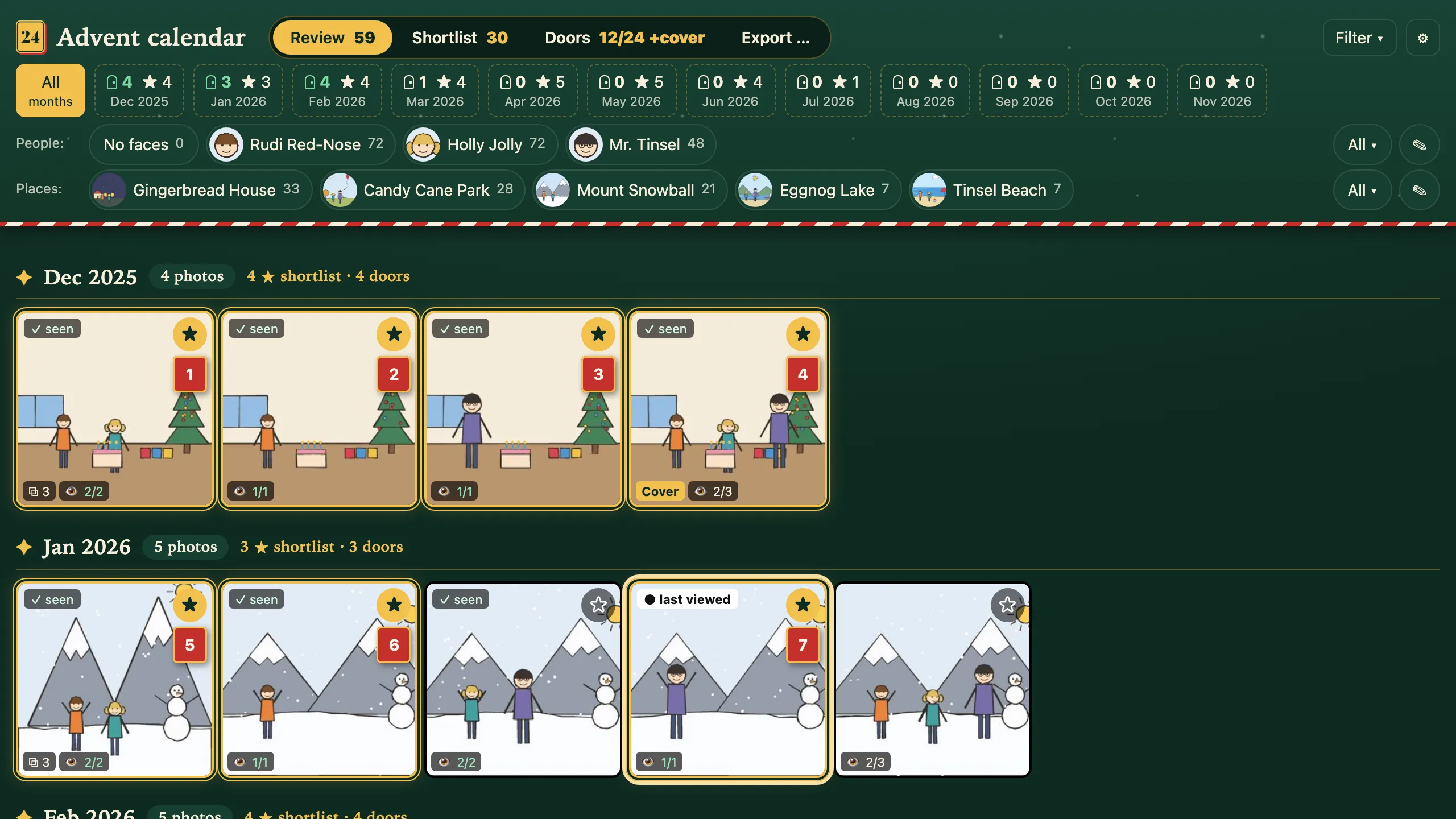
I wanted a shortlist before the final 24. I asked what happens when I star more than 24 photos, because I wanted to choose the final set from a shortlist. So the picker got two stages. A star puts a photo on the shortlist, with no limit. The + under the star makes it a door, and the 25th door is refused. One more photo can be the cover.
CEWE’s website didn’t show the doors. It gives the calendar’s outer size, 30.5 x 21 cm, and the order deadline. It says nothing about the photos behind the doors. I had the project open in CEWE’s desktop software, so I asked Claude to look there. I had only put photos of scenery without people into it, so Claude saw no family photos. The screen showed 24 square doors in six columns and four rows, laid over the whole cover photo. The picker now shows a square crop for door photos and the door grid on top of a cover candidate, so I can see whether a cut line runs through a face.
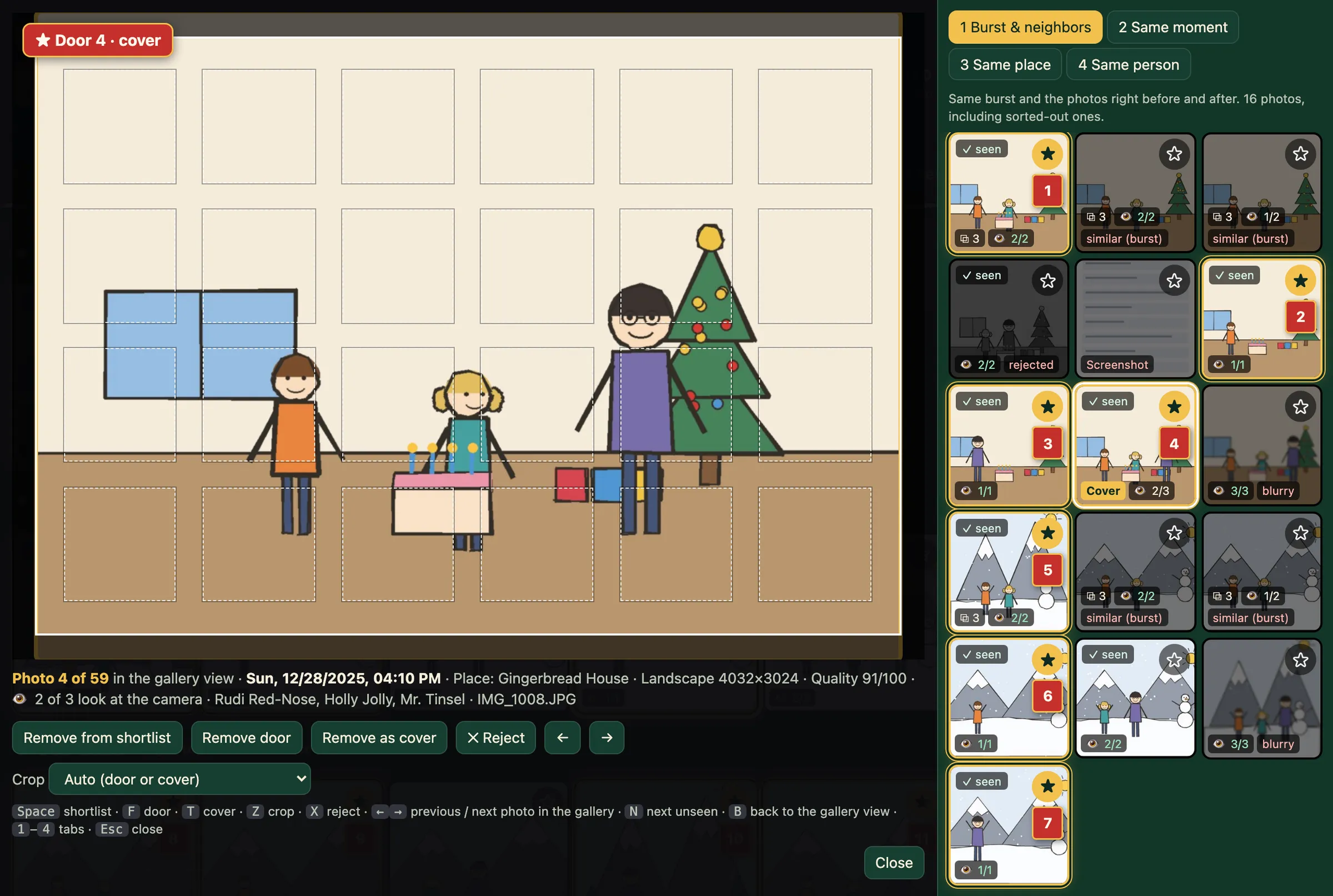
Smaller requests followed the same way. The page keeps filters and scroll position in the URL, so a reload brings me back to the same photo. Photos I’ve opened get a “seen” mark.
Claude told me that a new button was at the end of the row. It wasn’t. Claude edited the page in its own workspace in the cloud and then copied it to my Mac. That copy had brought over the old file, and Claude hadn’t checked what arrived. After that, it checked the file on the Mac before it told me to reload.
Claude never saw the page in a browser with my photos, and that was on purpose. The page shows my family’s faces, so Claude tested its logic with made-up data, and I told it whether the page looked right. The repo keeps that rule in AGENTS.md, the file an agent reads before it sets up the picker:
AGENTS.md
Never look at the photos yourself. Do not open, view, describe or analyze any photo, preview, thumbnail or face crop. […] Anything you look at may go to your model provider. Work only from the scripts' output and their error messages.

Do not look at the page either. Do not screenshot, read or inspect index.html once it shows their photos. To check that the page works, run make_demo.py and look at demo/index.html, which shows sketches.
At the end of the afternoon, Claude also wrote a script that puts the door photos and the cover into the CEWE project. The file format isn’t documented, so Claude compared two projects I had saved and wrote a script that always creates a new project file and never touches the original. It centers each crop on the faces that the models on my Mac had found, so this step ran locally too. A test project with the cover and four doors opened cleanly in CEWE’s software.
The script isn’t in the repo. The format belongs to CEWE, and every photo service has its own, so your agent works it out from your own files. RECIPE.md in the repo has the steps and a prompt for it.
The day after, I got the repo ready for other people. The picker reads photos from subfolders too, such as an iPhone’s DCIM folder or a Google Takeout download, and shows a row of places under the row of people. Places can be renamed, merged and split, and places with fewer than five photos go under “Other”. It also fits a phone screen, and it runs on Windows.
The repo has safeguards as well. The scripts that read the photos switch off their own network access, never write into the photo folder and refuse to run from inside it. The page can load only local files, and AGENTS.md tells agents never to look at the photos themselves.
An AI coding agent such as Claude Code, Codex or Cursor can set up the picker and run the scripts for you. Start it in an empty folder and paste this prompt, with your photo folder and the first day you want:
Prompt
Set up the Advent photo picker from https://github.com/grinser/advent-photo-picker on this computer and follow its AGENTS.md. My photos are in [folder]. Use the photos from [date] on. Don't upload my photos anywhere.
You still pick the photos yourself, in the page the agent opens for you. The README also describes every step for doing it by hand.
“Looking at the camera” is an estimate. The picker uses MediaPipe Face Mesh, which finds 478 points per face, and tests three things: the eyes are open, the head faces the camera, and the iris sits in the middle of the eye. I haven’t checked how often it’s right, and faces under 80 pixels get no verdict. It’s an optional step that needs Python 3.12.
My kids are hard for the face model. The split works, but one child still shows up as several small groups.
I’ve tested two setups. The picker ran with Python 3.14 on macOS and Python 3.12 on Windows 11. Linux should work, but I haven’t tried it.
The face model has a license limit. The ArcFace model comes from the InsightFace project and is licensed for non-commercial research. I use it for a private calendar, and I read the terms as allowing that.
On 1 December, the grandparents open the first door, and I hope to see their faces light up. AI saved the Advent season.
I paid for everything myself. Nobody sponsored this article, and none of the links earn me anything. The picker keeps your photos on your computer, but no safeguard is complete, so watch what your AI agent does and use the picker at your own risk. The code comes without warranty. CEWE is a trademark of its owner, and I’m not affiliated with it.

How I got live power data from my apartment's smart meter into Home Assistant for €38, using the board Claude told me not to buy.